Abigail's Flower
| Buff |  Abigail(Desktop, Console and Mobile versions) Abigail(Desktop, Console and Mobile versions) |
|---|
| Buff tooltip | Abigail will fight to protect you |
|---|
- Internal Item ID: 5114 (Desktop, Console and Mobile versions)
- Internal Tile ID: 624
- Internal Buff ID: 335 (Desktop, Console and Mobile versions)
- Internal Projectile ID: 963, 970
The three stages of Abigail's head flower.
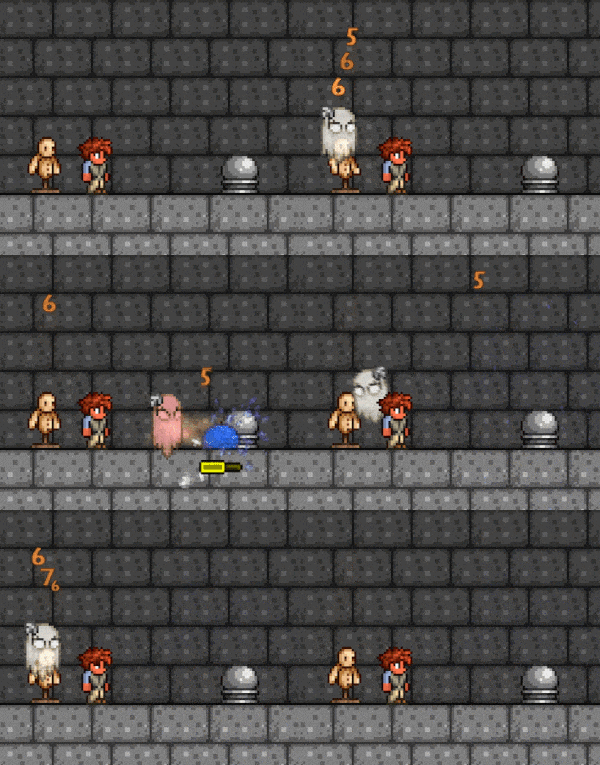
Abigail floating toward and proceeding to attack a
Blue Slime. Note the passive damage dealt to the
Target Dummy.
Abigail's Flower is a pre-Hardmode summon weapon that summons the Abigail minion. Abigail attacks by floating to enemies and flashing a light on them, similar to the Medusa Head. Like other minions, the summoned Abigail is invincible and follows the player for an unlimited amount of time, unless the player dies, summons a replacement minion, cancels the buff, or leaves the world. When idle, the summon will still do damage towards entities.
Abigail's Flower is special in that if used more than once, multiple Abigails do not spawn – instead, the spawned Abigail becomes stronger and faster for each additional summon. Like the Stardust Dragon and the Desert Tiger, Abigail has a visual indicator for the number of times she is summoned, as the flower on her head will change shape and develop a redder hue for each stage.
Abigail's Flower can be uncommonly found as a plant growing on grass near a placed Tombstone, regardless of world progression. Its spawn chance is increased in The Constant secret world seed. The flower breaks in one hit when mined, and makes a grassy sound when doing so.
Its best modifiers are Mythical, Furious, or Godly. Due to its low base damage, all damage-improving modifiers +10% or greater improve its damage by the same amount. A Ruthless Abigail's Flower has no lasting advantage over one with other modifiers, as it deals less knockback.
Notes
- Abigail's base damage starts at 6 and will increase each time she is summoned thereafter. It will increase by 3–4 damage (55% of the base damage) in pre-Hardmode and by 7–8 damage (130% of the base damage) in Hardmode.[1] For example, using Abigail's Flower five times will cause Abigail to deal 19 damage in pre-Hardmode and 37 damage in Hardmode.
- Abigail also increases in movement speed, acceleration, and max number of enemies she can damage at once with each summon.[2]
- In regular worlds, Abigail's Flower can only grow on the surface layer and above. In don't dig up and get fixed boi worlds, it can grow at any layer.[3]
- The Abigail's Flower grows on most types of grass (see below) that is no more than 10 tiles away (horizontally and vertically) from any type of Tombstone, and can replace existing plants.[4] It cannot grow within a 240×240-tile rectangle centered on another Abigail's Flower[5] (i.e., multiple flowers need at least 120 tiles horizontally or vertically between them).
Tips
- It may help to make a large area of Tombstones evenly spaced out in large areas while trying to obtain this item, as it will have more potential locations to grow.
- It is best to be used with another item that can counter an enemy's movement, as Abigail cannot move while attacking.
- Despite being a pre-Hardmode summon weapon, Abigail's Flower can work well in Hardmode, and can be a good substitute for Hardmode summon items, particularly due to the fact that it gains additional damage per summon in Hardmode. This is especially noticeable when paired with the Firecracker.
Trivia
- Despite being a plant, Abigail's Flower cannot be grown by walking over grass blocks with Flower Boots equipped, like other plants.
- The flavor text of the item is a reference to Wilson's examination quote for Abigail's Flower in Don't Starve Together.
- Abigail's Flower is tied with the Blade Staff for the lowest base damage of any summon weapon.
- Abigail's Flower and the Terraprisma are the only minion-summoning weapons that do not have the word staff in their name.
- Abigail will occasionally make the sound of a laughing Pipspook, an entity in Don't Starve Together.
- This also makes Abigail the only summoned minion who has idle sound effects.
See also
History
- Desktop 1.4.4:
- Now breaks in one hit when mined, and makes a grassy sound when doing so.
- Can no longer grow on Jungle grass.
- Desktop 1.4.3.2:
- Increased base speed by 33%.
- Decreased speed growth per minion from 1.5 to 1.4 (ends at exactly the same value at 11-minion).
- Improved base acceleration by 10%.
- Decreased acceleration growth from 2 to 1.75 (maxes out at the same minion count).
- Fixed (again) Abigail's Flower growth not appearing on servers, requiring players to log in again to see it.
- Desktop 1.4.3.1:
- Increased spawnrate by 33%.
- Abigail can now only hit up to 3 enemies at once per "attack". This cap increases with additional summons.
- Fixed an issue where Abigail's Flower would not visually sync on servers when it grew (rendering it invisible until the player rejoined).
References
 Spider Staff(Desktop, Console, Old-gen console and Mobile versions)
 Blade Staff(Desktop, Console and Mobile versions)
 Sanguine Staff(Desktop, Console and Mobile versions)
 Optic Staff(Desktop, Console, Old-gen console and Mobile versions)
 Pirate Staff(Desktop, Console, Old-gen console and Mobile versions)
 Pygmy Staff
 Raven Staff
 Desert Tiger Staff(Desktop, Console and Mobile versions)
 Tempest Staff
 Deadly Sphere Staff(Desktop, Console and Mobile versions)
 Terraprisma(Desktop, Console and Mobile versions)
 Xeno Staff(Desktop, Console and Mobile versions)
 Stardust Cell Staff(Desktop, Console and Mobile versions)
 Stardust Dragon Staff(Desktop, Console and Mobile versions)
Tavernkeep's Sentries(Desktop, Console and Mobile versions) Pre-Hardmode
- Wooden Sword
- Cactus Sword
- Zombie Arm
- Gladius(Desktop, Console and Mobile versions)
- Breathing Reed ((Desktop, Console and Mobile versions))
- Ruler ((Desktop, Console and Mobile versions))
- Umbrella ((Desktop, Console and Mobile versions))
- Tragic Umbrella(Desktop, Console and Mobile versions)
- Tentacle Spike(Desktop, Console and Mobile versions)
- Mandible Blade(Desktop, Console and Mobile versions)
- Bladed Glove
- Stylish Scissors(Desktop, Console and Mobile versions)
- Candy Cane Sword(Desktop, Console, Old-gen console and Mobile versions)
- Bat Bat(Desktop, Console and Mobile versions)
- Bone Sword
- Flymeal(Desktop, Console and Mobile versions)
- Katana(Desktop, Console, Old-gen console and Mobile versions)
- Ice Blade
- Muramasa
- Exotic Scimitar(Desktop, Console and Mobile versions)
- Phaseblade
- Starfury
- Purple Clubberfish
- Enchanted Sword
- Bee Keeper
- Blade of Grass
- Falcon Blade
- Night's Edge
- Pearlwood Sword
- Classy Cane(Desktop, Console and Mobile versions)
- Waffle's Iron(Desktop, Console and Mobile versions)
- Ham Bat(Desktop, Console and Mobile versions)
- Slap Hand(Desktop, Console and Mobile versions)
- Breaker Blade
- Phasesaber
- Ice Sickle
- Cutlass
- Frostbrand
- Excalibur
- Seedler(Desktop, Console and Mobile versions)
- Beam Sword
- Bladetongue(Desktop, Console and Mobile versions)
- Brand of the Inferno(Desktop, Console and Mobile versions)
- Death Sickle
- Fetid Baghnakhs(Desktop, Console and Mobile versions)
- Keybrand
- Psycho Knife(Desktop, Console and Mobile versions)
- Flying Dragon(Desktop, Console and Mobile versions)
- The Horseman's Blade
- Christmas Tree Sword
- True Excalibur
- True Night's Edge
- Terra Blade
- Influx Waver(Desktop, Console and Mobile versions)
- Starlight(Desktop, Console and Mobile versions)
- Star Wrath(Desktop, Console and Mobile versions)
- Meowmere(Desktop, Console and Mobile versions)
- Tizona(Old-gen console and 3DS versions)
Yoyos(Desktop, Console and Mobile versions) Other
- Terragrim(Desktop, Console and Mobile versions)
- Arkhalis(Desktop, Console and Mobile versions)
- Shadowflame Knife(Desktop, Console and Mobile versions)
- Jousting Lance(Desktop, Console and Mobile versions)
(
- Hallowed(Desktop, Console and Mobile versions)
- Shadow(Desktop, Console and Mobile versions)
)
- Sleepy Octopod(Desktop, Console and Mobile versions)
- Scourge of the Corruptor
- Vampire Knives
- Sky Dragon's Fury(Desktop, Console and Mobile versions)
- Daybreak(Desktop, Console and Mobile versions)
- Solar Eruption(Desktop, Console and Mobile versions)
- Zenith(Desktop, Console and Mobile versions)
Bows- Wooden
- Copper
- Tin
- Iron
- Lead
- Silver
- Tungsten
- Gold
- Platinum
- Blood Rain(Desktop, Console and Mobile versions)
- Demon
- Tendon
- Hellwing(Desktop, Console and Mobile versions)
- The Bee's Knees(Desktop, Console and Mobile versions)
- Molten Fury
- Marrow
- Phantom Phoenix(Desktop, Console and Mobile versions)
- Daedalus Stormbow(Desktop, Console and Mobile versions)
- Ice
- Shadowflame(Desktop, Console and Mobile versions)
- Aerial Bane(Desktop, Console and Mobile versions)
- Tsunami
- Pulse(Desktop, Console, Old-gen console and Mobile versions)
- Eventide(Desktop, Console and Mobile versions)
- Phantasm(Desktop, Console and Mobile versions)
- Sharanga(Old-gen console and 3DS versions)
Consumable
- Paper Airplanes(Desktop, Console and Mobile versions)
- Snowball
- Rotten Egg
- Shuriken
- Throwing Knife
- Star Anise(Desktop, Console, Old-gen console and Mobile versions)
- Spiky Ball
- Frost Daggerfish(Desktop, Console and Mobile versions)
- Javelin(Desktop, Console and Mobile versions)
(
- Bone(Desktop, Console and Mobile versions)
)
- Holy Water
- Bone
- Molotov Cocktail(Desktop, Console, Old-gen console and Mobile versions)
- Beenade
- Grenade
(
- Sticky(Desktop, Console, Old-gen console and Mobile versions)
- Bouncy(Desktop, Console and Mobile versions)
- Happy(Desktop, Console and Mobile versions)
)
Direct
Other- Wand of Sparking(Desktop, Console and Mobile versions)
- Wand of Frosting(Desktop, Console and Mobile versions)
- Gray Zapinator(Desktop, Console and Mobile versions)
- Aqua Scepter
- Thunder Zapper(Desktop, Console and Mobile versions)
- Space Gun
- Ice Rod
- Golden Shower
- Demon Scythe
- Laser Rifle
- Magic Dagger
- Orange Zapinator(Desktop, Console and Mobile versions)
- Sky Fracture(Desktop, Console and Mobile versions)
- Shadowflame Hex Doll(Desktop, Console and Mobile versions)
- Crystal Serpent(Desktop, Console and Mobile versions)
- Leaf Blower
- Frost Staff
- Poison Staff
- Razorpine
- Heat Ray
- Venom Staff(Desktop, Console, Old-gen console and Mobile versions)
- Unholy Trident
- Bubble Gun
- Laser Machinegun(Desktop, Console and Mobile versions)
- Charged Blaster Cannon(Desktop, Console and Mobile versions)
- Last Prism(Desktop, Console and Mobile versions)
- Betsy's Wrath(Desktop, Console and Mobile versions)
- Zapinator(3DS version)
Minions
- Finch Staff(Desktop, Console and Mobile versions)
- Slime Staff
- Flinx Staff(Desktop, Console and Mobile versions)
- Abigail's Flower(Desktop, Console and Mobile versions)
- Vampire Frog Staff(Desktop, Console and Mobile versions)
- Hornet Staff(Desktop, Console, Old-gen console and Mobile versions)
- Imp Staff(Desktop, Console, Old-gen console and Mobile versions)
- Blade Staff(Desktop, Console and Mobile versions)
- Spider Staff(Desktop, Console, Old-gen console and Mobile versions)
- Sanguine Staff(Desktop, Console and Mobile versions)
- Optic Staff(Desktop, Console, Old-gen console and Mobile versions)
- Pirate Staff(Desktop, Console, Old-gen console and Mobile versions)
- Pygmy Staff
- Desert Tiger Staff(Desktop, Console and Mobile versions)
- Raven Staff
- Deadly Sphere Staff(Desktop, Console and Mobile versions)
- Tempest Staff
- Terraprisma(Desktop, Console and Mobile versions)
- Xeno Staff(Desktop, Console and Mobile versions)
- Stardust Cell Staff(Desktop, Console and Mobile versions)
- Stardust Dragon Staff(Desktop, Console and Mobile versions)
Whips(Desktop, Console and Mobile versions) 


.gif)


